Android and iPhone
Scan the QR code. Continue from your phone browser.
Run Claude Code or Codex on your Mac. Your teammates pair their own phones, take a role, and watch, steer and approve the same session, from anywhere. No calls, no screen shares, no prompt handoffs.
Your team shares one  Claude Code and
 Codex session on one Mac: anyone with the role taps Allow from a phone, and goals keep building after everyone logs off.
Claude Code and Codex. Other engines are experimental.
Claude CodeCodex OpenCode
 Copilot
 Grok
 Kimi
 Hermes
 Ollama
Today an agent lives in one person's terminal. Every handoff means a call, a screen share, and a retelling of every prompt. ctrl+all gives the session a room.
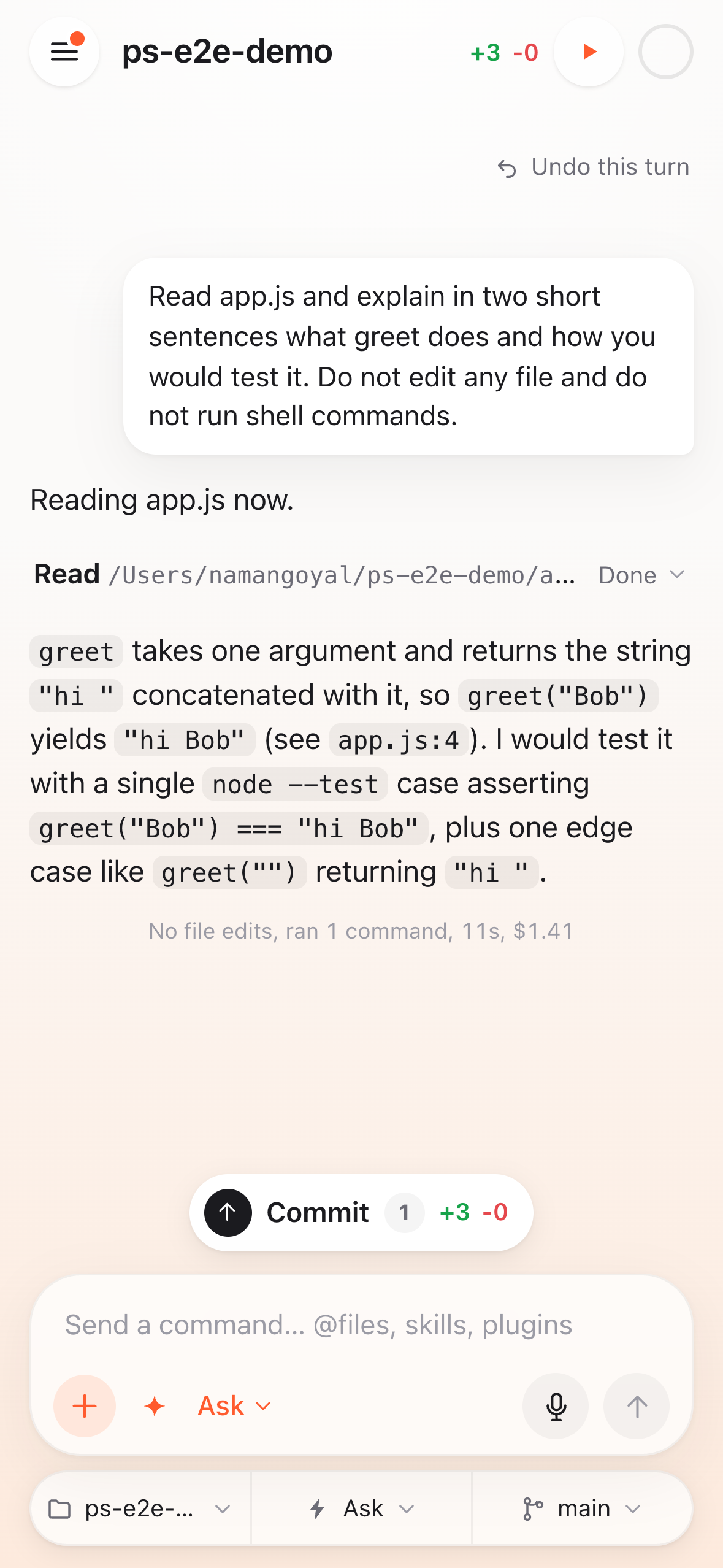
One session. Every paired phone sees the same turn, live.
Steer it mid-run from any phone. A permission card takes one Allow, from whoever has the role.
Invite teammates as owner, operator or viewer. Goals keep building overnight.
Tap Allow on the phone. The Mac answers. Then start a goal or open the terminal.
/Users/you/ps-e2e-demo/app.jsDone/Users/you/ps-e2e-demo/app.jsWaitingAllow Edit to edit /Users/you/ps-e2e-demo/app.js?
Run the same prompt on a schedule and keep the results. A routine opens a fresh chat each time.
/Users/you/ps-e2e-demo
~/ps-e2e-demo/app.jsDone~/ps-e2e-demo/app.jsWaitingAllow Edit to edit app.js?
Tap Allow or Deny. The Mac window answers too.
Scan the QR code. Continue from your phone browser.
Choose a project folder. Keep its chats together.
Use Claude Code or Codex with your existing subscription.
Choose whether to read existing Claude Code and Codex chats on your Mac.
Open a project shell. View it and send commands from your phone.
Set a goal or schedule a routine. Review the results.
Choose View only, Operate, or Full control for each paired phone.
See available updates in Settings. Restart when your work can pause.
Use installed skills and connected MCP servers with supported assistants.
Use your existing agent subscriptions on your Mac. ctrl+all adds no token charges. The Mac app is free; the hosted relay costs extra.
It finds the agent CLIs you already have.
Scan the QR in any phone browser. It keeps its own keys.
Each teammate pairs their own phone, with a role.
Free Mac app. Needs macOS 14.5 or later. Runs on Apple silicon and Intel. The hosted relay has a separate Pro subscription.
Signed with an Apple Developer ID and notarized by Apple. Updates arrive in the sidebar: click "Restart to update".
Everything on the Mac is free. Pro is the relay we run for you.
Free $0
Everything on your Mac, with a relay you run yourself.
Pro $12a month Or $120 a year, which saves $24. The first 30 days are free. Card required.
Everything in Free, plus the relay we run for you.
US list prices. Regional prices, taxes, and currency fees appear at checkout.
Team $30 per seat a month. Coming soon.
Device collaboration works today. Paid Team subscriptions are coming soon.
Join the waitlistPrefer to run your own relay? It's free and documented.
ctrl+all is a Mac app that runs coding agents on your Mac. A paired phone browser lets you view chats, send tasks, and answer supported approval requests. Your Mac must stay awake and connected.
It started in remote hackathons: every time a teammate wanted to help with a coding agent, helping meant a call and a screen share just to hand over prompts and guidance. ctrl+all keeps the work in one shared session, so the team builds together instead of re-explaining.
Yes. Scan the pairing QR code on your Mac and open the link in your Android or iPhone browser. You do not need a native phone app.
Watch shortcuts are a preview with manual setup. Use a paired iPhone, an awake Mac, and a private connector with HTTPS access. You can dictate a task, read its reply, and answer supported Claude permissions.
Open New chat. Choose your project folder and an available assistant, such as Claude Code or Codex. Sign in to the assistant if required. Send your task, then pair your phone to continue remotely.
ctrl+all manages its own project shells. You can return to those shells from the app and use terminal controls from a paired phone. It does not attach to an existing Terminal.app or iTerm session.
Yes. Open History and choose whether ctrl+all can read those local files. The viewer does not resume old chats or send history to a phone or agent.
Those show one person one terminal. ctrl+all runs the agents on one Mac as a shared session: teammates join with roles, one Allow from anyone with the role answers the prompt for all, and a goal keeps building after everyone logs off.
One Mac runs the engine, and the owner invites teammates by role: viewers watch, operators run chats and approve steps, owners also manage people. Each pairs their own phone and sees the same chats, goals and inbox, fenced to their role.
No. Your agent processes and code stay on your Mac. Use your existing agent vendor accounts. The public download requires Google sign-in. Pro adds a billing subscription for the hosted relay. You can also run your own relay.
Claude Code and Codex, each as it would run in your terminal, on the subscription you already have. OpenCode, Grok, Hermes, Kimi, GitHub Copilot and a local Ollama model run as experimental engines.
Yes. ctrl+all can find installed skills and connect MCP servers. Support depends on the assistant. Use the CLI for scripted tasks. Project instructions stay with the project.
The skills marketplace is coming soon. You can use your installed local skills now.
Your agent vendor bills your account; ctrl+all adds no token charges. The Mac app and a self-hosted relay are free. Pro includes the hosted relay and a 30-day trial. US list prices are $12/month or $120/year. Regional prices, taxes, and currency fees appear at checkout. Enter a card to start the trial.
The relay sees connection metadata and frame sizes. Your devices seal message frames with X25519, Ed25519 and ChaCha20-Poly1305, so the relay cannot read their contents. The relay also serves the phone client, so you trust its operator for that code.
The Mac app checks GitHub for updates and sends usage counts to ctrlall.app by default. Turn usage counts off in Settings → Reports. Read every usage event and its allowed properties.
Crash reports send filtered app diagnostics when the build supports reporting. Review or disable them in Settings. Usage counts have a separate control.
Yes. The ctrlall CLI ships inside the app, and ctrlall relay show prints the relay in use. For a phone on your Wi-Fi or tailnet, the relay install script runs a relay on the Mac. For a phone anywhere, put Tailscale Funnel in front of it or run ctrlall relay tunnel. Either way the relay only forwards sealed frames it cannot read.
No. Since version 1.0.0 the app is signed with an Apple Developer ID and notarized by Apple. If macOS does warn you, or says the app is damaged, do not override it: the file is not the one we published. Delete it and write to support@ctrlall.app.
Claude CodeCodexOpenCodeCopilotOllamaWe use your email only to send ctrl+all release news.